If your balance looks off since the latest update, this is probably why.
Balance not adding up since the update? Past-dated entries sitting in your pending list aren't being counted in your balance yet.
- To fix: open your pending list and tap Mark as settled on each past-dated entry. These could be from recurring transactions or one-off future transactions you added earlier.
- To revert to previous behaviour: turn on Pending, settles automatically, either on a recurring transaction (Books → Recurring transactions → tap it → hourglass icon) or on a future one-off (hourglass on the add screen). On a recurring transaction, this also settles its past entries (give it up to 15 minutes to take effect).
The why, and the full how-to, are below.
First, an apology. In our 6.2.0 update we made one of the biggest changes to how the app works, and we didn't explain it well. If your balance has looked off since then, that's on us. Let me walk you through what changed, why your numbers might look off, and how to set things straight in a couple of minutes.
If your balance looks right, you don't need to do anything. Nothing here is broken and no data has gone anywhere, though you might still like to know how pending works.
What changed
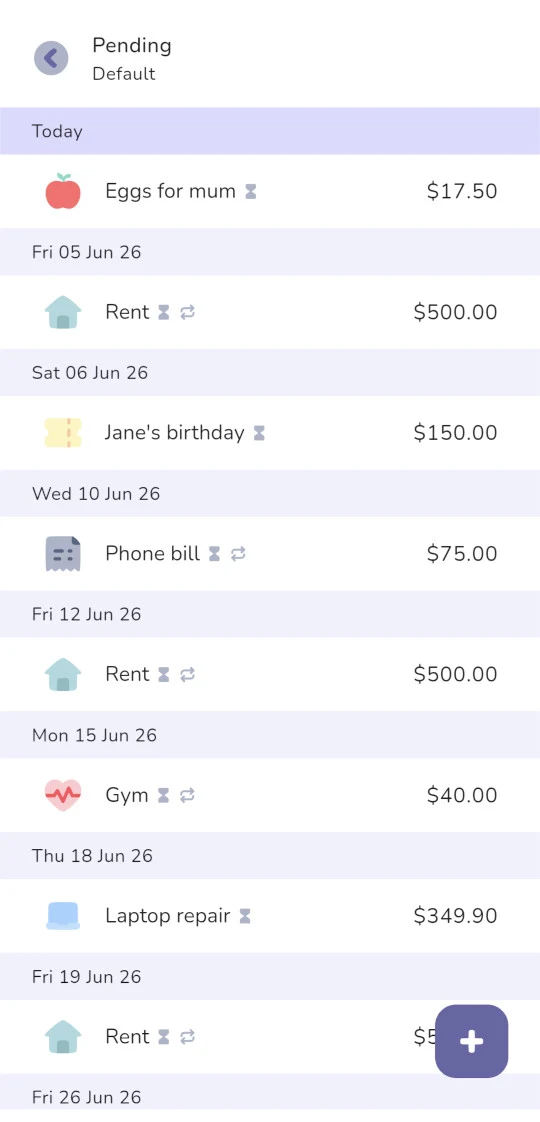
Every transaction now has a status. It's settled when the money has actually moved, and pending when it's still to come or waiting to clear. Anything you log dated today or in the past still goes straight in as settled, just like before, so your everyday logging hasn't changed. What's new is future-dated transactions: the one-offs you schedule and the transactions your recurring rules create now start as pending, sitting in their own list and not counting toward your balance until they're settled.
There's a new pending screen that shows everything you haven't settled yet: past-dated entries you've been meaning to action, future bills, anything still in flight. The idea is to let you put money you expect to move into the app without it skewing what you actually have right now. A clean list of what's coming, which you tick off as the money moves.
Why your balance might look off
Here's the part that's caught people out, and it mostly affects anyone who'd set things up before the update.
Before 6.2.0, transactions were split into upcoming and past. A recurring transaction dated in the future was counted automatically once its date passed, affecting your balance straight away. A recurring expense like rent or a gym membership was subtracted; recurring income like a salary was added. After the update, those same recurring rules create future entries that land in pending instead, and pending entries don't count until they're settled. So anything that used to move your balance on its own has quietly stopped doing so.
There's a setting behind this called auto-settle, and it's off by default for every recurring transaction and any future-dated one-off. With auto-settle off, a transaction stays pending until you settle it yourself. That's deliberate: the pending list doubles as a payment reminder, so you confirm each one as the money actually leaves your account. But if you didn't know that was happening, the effect is that money you've genuinely spent never gets subtracted.
For most people that shows up as a balance that looks too high. Money you've “spent” isn't being deducted, and the home screen stops lining up with your bank balances. If you've also got recurring or future income waiting in pending, a salary, say, that side looks too low for the same reason: it's not being added yet.
These past-dated pending entries come from two places:
- Recurring transactions with auto-settle off (the default). Every occurrence they generate stays pending until you switch the rule to auto-settle or settle it manually.
- One-off transactions left in pending. Future-dated one-offs have to be pending too (you can't settle money that hasn't moved yet), and they won't settle on their own once the date passes unless you turned auto-settle on when you added them. Auto-settle is off by default here as well.
In hindsight, leaving auto-settle off by default for recurring transactions was the wrong call. We should have had it on by default, which would have kept recurring transactions behaving the way they always had.
How to line your balance back up
There are two things worth doing: catch up the entries already sitting in pending so your balance reads right, then decide how you'd like new ones to behave.
1. Settle what's already in pending
This is the part that brings your balance back in line. Open your pending list and look for the past-dated entries. Those are what's missing from your balance.
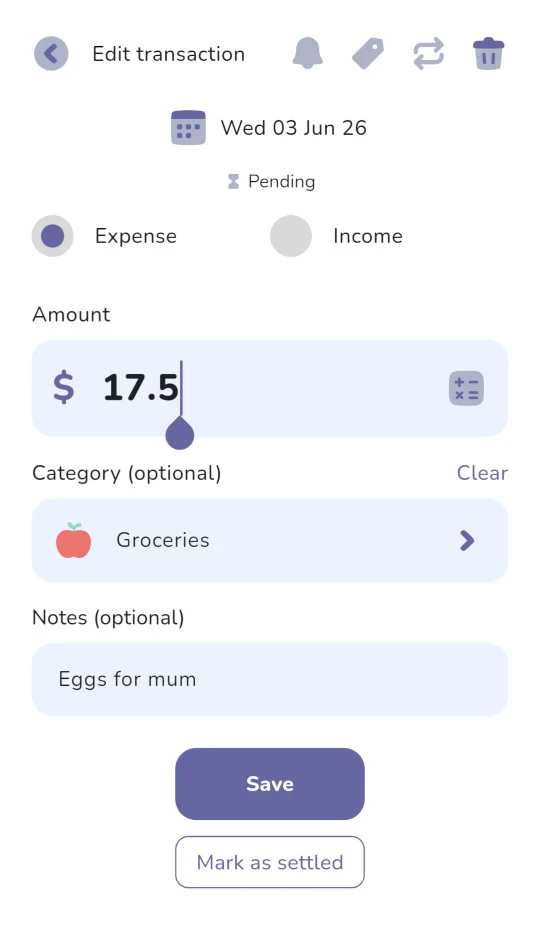
For each one, tap to open it and tap Mark as settled (just below Save at the bottom of the screen).
If a lot of those entries come from the same recurring transaction, there's a quicker way to clear them all at once, which is the next step.
2. Decide how new entries should behave
Now choose how you'd like things to work from here. This comes down to whether you like the reminder (especially if you make payments manually) or would rather do it automatically (best if you have automatic payments set up).
Keep settling them yourself. Leave auto-settle off and your pending list works as a payment reminder. You tap Mark as settled when each payment actually goes out. Good for answering “what have I still got to pay?”
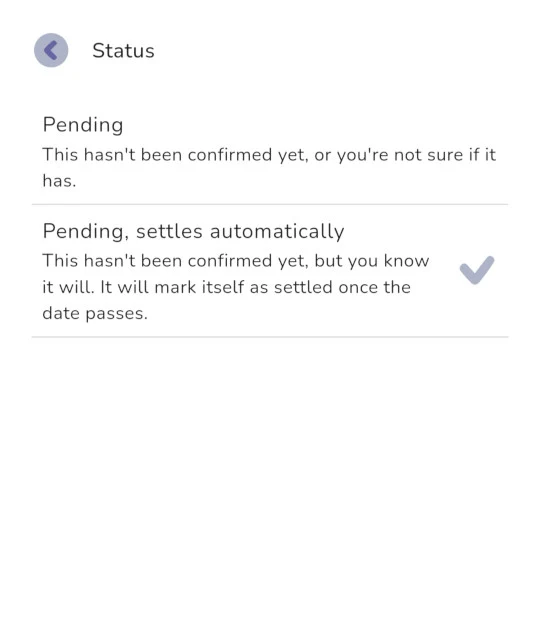
Let them settle automatically. Turn on Pending, settles automatically and entries settle themselves on their date, closer to how things worked before the update. There are two places you can set it:
- On a recurring transaction: Books → Recurring transactions → tap the one you want → hourglass icon (top right) → Pending, settles automatically. This also settles that rule's past-dated occurrences, so it doubles as a quick way to do step 1 for everything that recurring transaction created. It happens in the background rather than the instant you flip the setting, so give it up to 15 minutes (it catches up next time you open the app).
- On a future one-off: tap the hourglass on the add-transaction screen when you create it and choose Pending, settles automatically. It'll then settle itself once its date passes, and it's set per transaction, so you stay in control each time.
How pending affects your stats and budgets
Your balance isn't the only number pending touches, so it's worth knowing the rules we follow everywhere else in the app: anything that reports what's actually happened leaves pending out, and anything that helps you plan ahead counts it in. Pending money hasn't moved yet, so it shouldn't colour your history, but it's exactly what you want to see when you're looking forward.
Here's how that shows up in the places you'll notice:
- Your spending history and analytics (averages, past periods, no-spend days, your needs vs wants breakdown, the analytics charts) count settled only. They're a record of what really happened, so a pending bill you haven't paid won't inflate them.
- Budgets and pacing count settled and pending together. A pending bill is money you've already planned to spend, so your budget treats it as spoken for, and “left to spend” reflects what's genuinely free. You'll usually see the two parts side by side: what you've spent, and what's still reserved.
- Your home screen and calendar show both, kept visually distinct. In the calendar, pending transactions count toward your cash flow and total balance, and each shows a small hourglass icon in the transaction list. On the home screen it depends on the mode you're in: forecast mode includes pending in the main balance card and the income and expense category breakdown below it; cash flow mode leaves it out of both and shows only what's settled.
The pending and settled page in our user guide has the full list of what counts where.
Why we added pending in the first place
It's fair to ask why we changed something that was probably working fine for most of you. A few things came together at once.
First, some of you have been asking for it. A pending state was one of the more common requests we'd had: a way to record money you know is coming, a bill due next week, a transaction dated for the future, without it throwing off what you've actually got today. Pending gives you that. It separates “money I expect to move” from “money that's moved.” A few of you also asked specifically for control over when things flip from pending to settled.
Second, the timing lined up with our bank syncing feature, which we rolled out in Australia, Canada, and the US. Pending is part of how that works. When a transaction comes through from your bank but hasn't cleared yet, it sits in pending until it settles. The same idea that helps you plan a future bill also handles real-world transactions that haven't finished clearing.
It was a big change. Adding a status to every transaction touched a lot of the app, one-offs, recurring rules, transfers, stats, balance calculations, all of it, which is part of why the rollout wasn't as smooth or as well-explained as it should have been. That's the bit we got wrong, and it's what this post is trying to put right. We're also looking at ways to explain the pending feature better inside the app itself, so fewer people get caught out by it.
A few common questions
Is any of my data lost?
No. Nothing has been deleted or moved. Your pending transactions are all there in the pending list. They're just not counted in your balance until they're settled.
My balance looks right. Do I need to do anything?
No. If your numbers line up, you're all set. This mainly affects people who had recurring transactions or future one-off transactions set up before the update.
My balance looks too low, not too high. Is this the same thing?
Yes. If you've got recurring or future income sitting in pending, like a salary, it isn't being counted yet either, so that side reads low. Settling those entries adds them back. Same fix.
Can I make new transactions settle automatically?
Yes. Tap the hourglass when you add a transaction (or on a recurring rule) and choose "Pending, settles automatically". You set it per transaction.
In short
If your balance hasn't looked right, it's almost certainly past-dated pending transactions waiting to be settled, and you can sort it in a couple of minutes with the steps above. Pending takes a moment to get used to, but once it clicks, it's a genuinely useful way to see what's actually yours versus what's still on its way.
And if you're setting the app up from scratch, our budget setup walkthrough works through one person's complete setup, pending settings included.
If your numbers still don't add up after all this, we're happy to take a look. Reach us at hello@thebudgeting.app and we'll help you get it lined up.
Cheers,
Jeremy